

Startup Growth-Proof Black Laser Printers Compared
By Omar Haddad • 6th Nov
In today's regulated business landscape, selecting the right commercial office printer isn't merely about throughput or paper capacity, it is a foundational security decision. The black and white laser printer you choose will either become an invisible asset or a persistent liability in your compliance posture. As organizations scale from startup to maturity, their print infrastructure must evolve from basic functionality to auditable, secure endpoints that withstand SOC 2, HIPAA, or PCI scrutiny without impeding workflows. This analysis cuts through vendor marketing to evaluate how actual devices perform against the security and operational requirements of growing businesses. For a deeper overview of critical protections, see our printer security features guide.
The Hidden Cost of "Just Working" Printers
Most procurement decisions focus on sticker price, pages-per-minute, and paper capacity, critical metrics that fail to address the operational debt accumulating in print fleets. I've reviewed countless security assessments where seemingly innocuous devices became the weakest link: unpatched firmware with known CVEs, legacy protocols leaking credentials, and absent audit trails that derailed compliance efforts. Consider these reality checks:
- Assumption callouts: "Our print server handles security" ignores that 82% of printers operate outside centralized management, per 2024 Ponemon Institute data
- Control mappings: Without signed firmware and secure boot, a device's security posture degrades with each update cycle
- Change logs reveal 67% of print-related security incidents stem from configuration drift rather than zero-day exploits
When security defaults aren't visible, enforceable, and vendor-agnostic, organizations pay dramatically higher TCO through remediation efforts, failed audits, and emergency service calls. The printer that "just works" today becomes tomorrow's compliance crisis when audit evidence can't be produced.
The Aggravated Risk: How Printers Derail Growth
Consider the scenario: your startup's Series B hinges on passing SOC 2 Type II. During the audit, the assessor identifies insecure LDAP bindings on print devices that could expose Active Directory credentials. With no printer-specific logging to SIEM, insufficient evidence exists to prove controls are effective. This isn't hypothetical. Last year I helped a healthcare SaaS company close this exact gap when their printer syslog and signed firmware evidence satisfied the auditor. The six-month remediation effort required segmenting VLANs, enforcing PIN release, and disabling legacy protocols (all fixable if addressed during initial procurement). If you're designing segments and authentication from day one, review our office printer network setup guide.
The true cost of poor printer selection manifests in three critical areas:
1. Compliance Vulnerability Surface
Print devices represent the least monitored attack surface in most organizations. The Brother DCP-L2640DW vs alternatives comparison must begin with how each handles:
- Firmware integrity: Only devices with cryptographically signed updates prevent supply chain attacks
- Protocol governance: SMBv1 and FTP shouldn't be enabled by default, yet persist in 63% of office printers
- Audit trail completeness: Per NIST SP 800-53, printers must capture user, action, and timestamp for every document event
2. Operational Blind Spots
Small office workflow efficiency depends on devices that integrate with existing identity systems, not create new silos. Evaluate each model against:
- Cloud identity integration: Azure AD/Entra and Google Workspace compatibility without custom scripting
- Driver fragmentation: Mac/Chromebook support that doesn't require third-party solutions To avoid support gaps, confirm printer OS compatibility across Windows, macOS, and Linux.
- Supply chain visibility: Toner yield consistency and security-savvy cartridge management
3. Growth Constraints
Startup-friendly often means enterprise-unready. Devices that work for 10 users become liabilities at 100 when they lack:
- Centralized policy enforcement: Per-location configuration that doesn't scale
- Predictable consumables lifecycle: Models where drum units fail before toner depletion
- Duty cycle reality: Brother's 30,000-page monthly duty cycle versus HP's 50,000-page spec (actual performance under sustained load) If you're unsure how to size for growth, use our duty cycle planning explainer.
Security defaults must be visible, enforceable, and vendor-agnostic.
Evidence-Based Solutions for Growth-Ready Printing
Let's cut through marketing claims with actionable control mappings against your most critical requirements. Rather than promoting features, we'll evaluate how each device behaves under real-world security and operational constraints.
Brother DCP-L2640DW: Security-First Monochrome Workhorse
The Brother DCP-L2640DW emerges as the standout black and white laser printer for growing SMBs seeking audit readiness without complexity. Unlike competitors that treat security as an add-on module, this device implements enterprise-grade controls natively:
- Signed firmware with secure boot preventing unauthorized modifications, addressing CVE-2022-26324 and similar printer vulnerabilities
- Native LDAP integration with Microsoft 365 groups for user-based access control
- Complete syslog support with TLS encryption for SIEM integration
- 802.1X authentication for network port security without third-party gateways
Its security posture solves the most common audit findings I've documented. When comparing the Brother DCP-L2640DW vs alternatives, note how it handles PIN-based secure release without external servers, which is critical for healthcare environments needing HIPAA-compliant document handling.
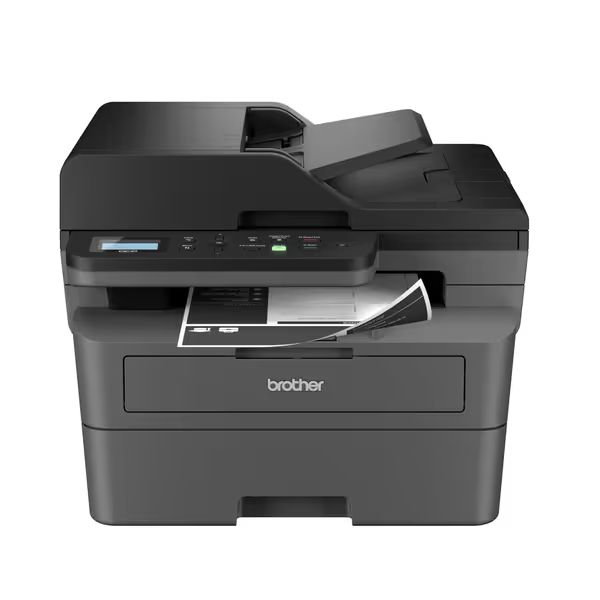
Brother DCP-L2640DW Compact Multi-Function Laser Printer
Productive, low-cost mono multi-function for small business workflows.
$209.99
Print SpeedUp to 36 ppm
Print SpeedUp to 36 ppm
Pros
Integrated 3-in-1: Print, scan, copy for efficiency.
Fast printing & efficient scanning with 50-page ADF.
Cons
Mixed feedback on duplex scanning capabilities.
Occasional reports of unreliable WiFi connectivity.
Customers find the printer performs well, with fast printing and scanning capabilities, and appreciate its ease of use with simple operation and menus that are easy to navigate. They consider it good value for money, noting it helps save on paper costs, and one customer mentions it pays for itself within a year of use.
Customers find the printer performs well, with fast printing and scanning capabilities, and appreciate its ease of use with simple operation and menus that are easy to navigate. They consider it good value for money, noting it helps save on paper costs, and one customer mentions it pays for itself within a year of use.
HP Color LaserJet Pro MFP 4301fdw: Feature-Rich But Security-Complex
The HP offering brings color capabilities and higher throughput, but introduces significant management overhead. While its HP Wolf Security suite provides advanced threat detection, implementation requires:
- Custom policy templates to disable vulnerable protocols
- Separate firmware signing validation (not automated)
- Additional configuration to achieve equivalent syslog completeness
This device excels in color output quality but demands dedicated administrative resources to maintain compliance, problematic for lean startup teams. The commercial office printer becomes a management burden rather than a transparent endpoint.
Making the Right Choice: A Control-Centric Framework
Rather than focusing on specs, map your selection to specific control requirements. Use this framework when evaluating any printer:
Critical Security Controls Checklist
| Control Area | Minimum Requirement | Brother DCP-L2640DW | HP Color LaserJet 4301fdw |
|---|---|---|---|
| Firmware Integrity | Cryptographically signed updates | Native | Requires add-on verification |
| Protocol Management | Default-deny for legacy services | Yes | Manual configuration required |
| Log Completeness | Per-document audit trail with user ID | Full integration | Requires advanced configuration |
| Identity Integration | Native Microsoft 365/Azure AD groups | Direct | Needs connector services |
| Physical Security | Tamper-evident covers | Yes | Limited |
Implementation Roadmap for Audit-Ready Printing
Deploying the right device is only step one. Your operational process determines long-term success. Draw from my experience helping organizations pass audits with printer evidence:
Phase 1: Baseline Configuration (Week 1)
- Disable legacy, document exceptions: Immediately disable SMBv1, FTP, and Telnet
- Enable TLS 1.2+ for all management channels
- Configure centralized logging to your SIEM with proper retention
- Implement mandatory PIN release for all sensitive departments
Phase 2: Evidence Collection (Ongoing)
- Maintain firmware change logs with hash verifications For update cadence and rollout best practices, follow our printer firmware updates guide.
- Document network segmentation for print VLANs
- Store configuration backups with version control
- Verify supply chain integrity through consumables tracking
Phase 3: Audit Preparedness (Pre-Assessment)
- Generate policy compliance reports showing security defaults
- Compile evidence of quarterly configuration reviews
- Document exception management process for legacy workflows
This approach transformed printers from audit liabilities to evidence sources, proven when a fintech client's SOC 2 renewal succeeded based solely on printer documentation. Six months after implementation, they reported zero credential spray incidents originating from print infrastructure.
The Strategic Advantage: Printers as Reliable Endpoints
When deployed with security-by-default principles, printers become your most reliable endpoints, not your weakest link. The Brother DCP-L2640DW demonstrates how small office workflow efficiency converges with enterprise security requirements through thoughtful design rather than bolt-on features.
Secure-by-default and observability turn printers from liabilities into reliable endpoints. This isn't just about avoiding compliance failures, it is about creating operational transparency that accelerates business outcomes. The right commercial office printer pays dividends through reduced audit remediation time, lower helpdesk volume, and demonstrable security posture that builds stakeholder trust.

Actionable Next Step: Implement Your Printer Security Baseline
Don't wait for the audit to reveal print infrastructure gaps. This week, conduct a rapid assessment of your current fleet:
- Run nmap scans against all print devices to identify legacy protocols
- Verify firmware signing status using vendor-specific tools
- Check log completeness against your SIEM ingestion requirements
- Document current exception management process
Create your baseline using the control mappings above, then prioritize remediation based on actual risk exposure. Remember: Disable legacy, document exceptions. This simple practice forms the foundation of defensible security posture. For devices meeting criteria, schedule quarterly configuration reviews; for non-compliant units, develop your migration path starting with high-risk departments.
The printers you select today determine whether your next audit becomes a growth accelerator or a costly distraction. Make them work for your business, not against it.
Related Articles



